The grassroots-only rule
To prevent government insiders from gaming the process, two networks are blocked from creating, signing, or sponsoring e-petitions:
- Government of Canada email domains (anything ending in
.gc.ca)
- Parliament of Canada networks (any device connected to a Parliament network)
The petition system enforces both. You can't sign from your work laptop if you work for the federal government. This is a feature: it preserves the citizen-led character of the petition.
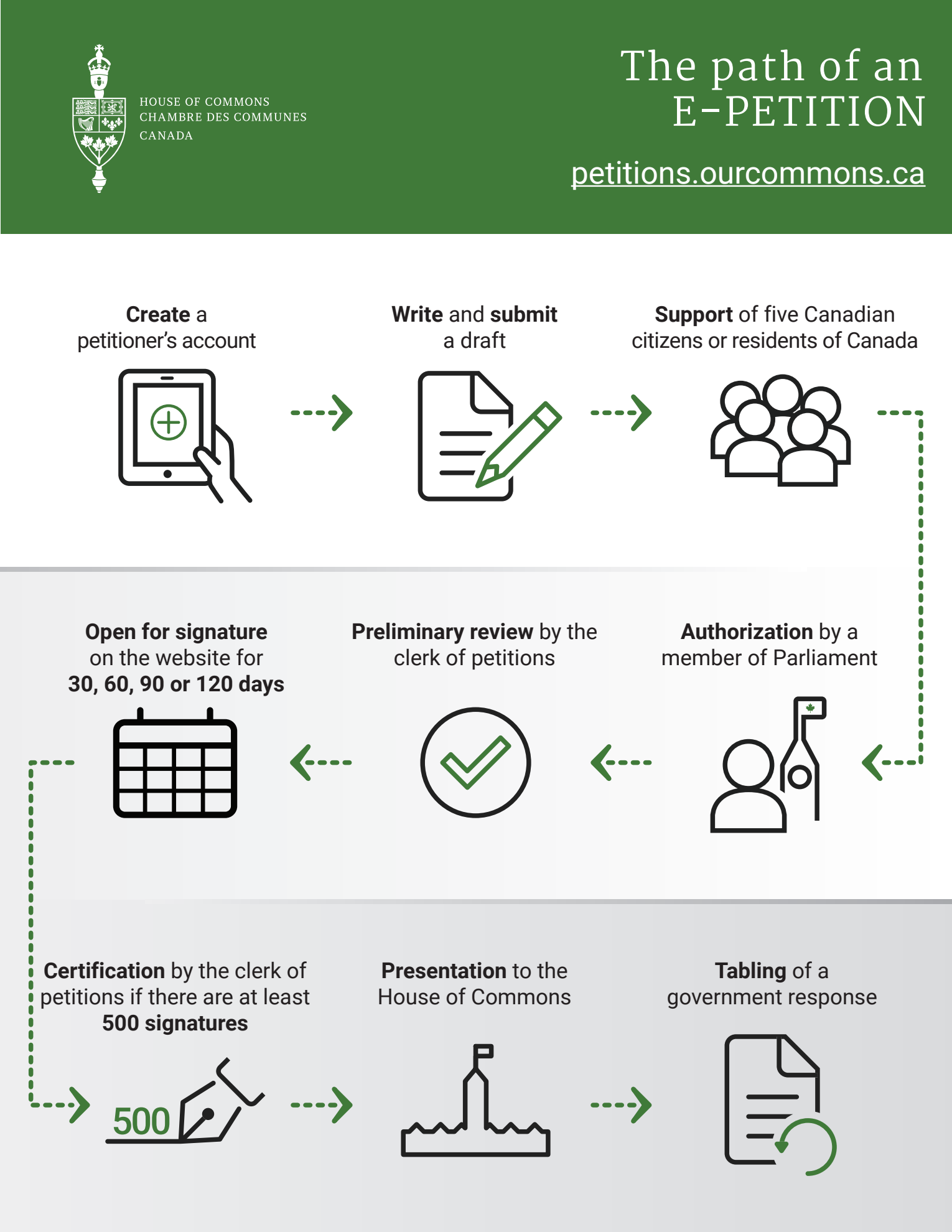
The six steps to a petition
1Draft the petition
Every petition has three parts:
- The Addressee — must target the House of Commons, the Government of Canada, a Minister, or a specific MP
- The Grievance (optional) — the "Whereas" section that states the facts or opinions backing the request
- The Prayer — the actual ask. Must be a request for specific action (or inaction), not a demand
Hard limits: Maximum 250 words total. English or French only. Zero URLs or web links allowed.
Topic restrictions — your petition will be rejected if it:
- Deals with provincial or municipal matters (federal jurisdiction only)
- Touches anything currently before the courts (the "sub judice" rule)
- Uses libellous, disrespectful, or unparliamentary language
- Makes accusations against the Crown, Parliament, or the courts
- Is substantially the same as another active petition (you also can't have two of your own active simultaneously)
2Find 5 supporters
Before any MP will see your petition, it needs initial grassroots backing. You invite 5 to 10 supporters by email (you can't support your own petition). The first 5 people who accept become your official supporters and the petition's first official signatories.
Once you have 5 confirmed, the petition can be forwarded to a Member of Parliament.
3Get a Member of Parliament to sponsor
You pick an MP and send them the draft. They have 30 days to respond. Three outcomes:
- They accept → the petition moves to the Clerk for review
- They refuse → you can try a different MP (up to 5 attempts total)
- They ignore you / the 30-day window expires → counts as one of your 5 attempts
Important context. An MP sponsoring your petition does not mean they endorse what it says. Sponsorship just unlocks the parliamentary process. The system is non-partisan by design.
One rule worth knowing: Using an MP's name to promote your petition without their written consent is forbidden.
4The Clerk's examination
Once an MP sponsors the petition, the Clerk of Petitions — a non-partisan parliamentary official — reviews it for compliance with the rules. The Clerk checks:
- The form, content, and initial signatures meet the House's rules
- The topic falls within federal jurisdiction
- The language is appropriate
- It isn't a duplicate of an active petition
If approved, the text is translated into the other official language and published online within roughly 5 working days. If rejected, the Clerk explains why. You can revise and resubmit, but you have to start the entire process over from Step 1.
5Open the floor to the public
Once published, the petition opens for signatures. You pick the duration when you start: 30, 60, 90, or 120 days. Once chosen, this deadline can't be changed.
Who can sign:
- Any Canadian citizen (including those living abroad)
- Any resident of Canada (citizen or not)
- No minimum age
Signature rules: One person, one signature. One email address, one signature (shared family or office accounts can't sign multiple times). Once cast, signatures can't be withdrawn.
The double opt-in. When someone signs, they submit their personal details on the petition portal. An automated verification email is sent from no-reply@petitions.parl.gc.ca. The signer must click the verification link. If they don't, the signature stays unverified and will be rejected when the Clerk audits the final list.
6Crossing the 500-signature threshold
When the signature period ends, the Clerk audits the signatures and counts only the verified ones. Two outcomes:
- 500 or more verified signatures → the Clerk issues an official certificate to the sponsoring MP. The petition can now be formally presented in the House of Commons and officially recorded in the Journals of that day.
- Fewer than 500 → the petition proceeds no further. It stays visible online as a public record but never gets tabled or responded to.
After the petition is tabled
Once the sponsoring MP (or any MP, with the certificate) presents the petition in the House, the 45-day government response clock starts ticking.
- The response is legally required within 45 calendar days
- If Parliament isn't sitting on day 45, the response goes to the next sitting day
- The response is published online with the petition, unedited
- Everyone involved (petitioner, supporters, signatories, sponsoring MP) gets an automatic email when the response is tabled
The government can — and often does — respond with positions you'd consider weak, evasive, or rhetorical. But it has to respond, on the record, and you'll have the answer in writing.
What about prorogation or dissolution?
Parliament doesn't sit year-round, and sometimes elections interrupt everything. Two scenarios you should know:
Prorogation — the pause
Between two sessions of the same Parliament. The e-petition website stays online. You can create new petitions and gather signatures during a prorogation. But certified petitions can't be tabled, and government responses are paused until the new session opens.
Dissolution — the hard reset
When an election is called. The website closes immediately. All unpresented petitions are terminated. The government's obligation to respond lapses. The process restarts roughly three weeks after the election — and previous signatures cannot be carried over.
So if you're running a petition close to an election, watch the timeline.
How to use a petition effectively
A successful e-petition isn't just about hitting 500 signatures — it's about building visible public pressure. Once you have a certified petition tabled, journalists, advocacy groups, and your sponsoring MP can use it as evidence of public concern. The 45-day response itself is often the smallest part of the impact.
Tips:
- Choose the right MP sponsor. Sympathetic backbenchers, opposition critics on relevant files, and MPs who have spoken publicly on your issue are good targets.
- Time your signature window strategically. 120 days gives you the most runway but loses urgency. Shorter windows can build campaign energy.
- Promote thoughtfully. Petitions go viral when they're tied to a current event, but you have to be ready to absorb the attention.
- Have a Plan B. Many petitions fall short of 500. That's not failure — the petition's public record can still be cited and built on later.